Project Management Software
For Control4 Dealers & Custom AV Integrators
Why Choose WiZiGa?
"WiZiGa is the lightweight, practical alternative to overbuilt industry platforms — everything you need to run daily operations efficiently, from service calls to large projects."
- Kevin Dennehy, Founder
- Crews actually use it — simple, intuitive, and built for the field.
- Crews always know what to do next — tasks, notes, photos and job details.
- Scheduling finally makes sense with clean crew and PM views. When and where.
- Timesheets take 60 seconds — accountability becomes automatic.
- Service calls stop losing money with proper time and materials tracking.
- Continuity from prewire → install → service on every job thereafter.
- Instant client history: know exactly what you did last time.
- Materials, logs, historical data and much more.
What is WiZiGa?
WiZiGa fixes the daily operational mess so your team stays aligned, focused, and profitable.
Built by KRU Smart Homes, a Control4 integration company in Vancouver. “WiZiGa isn’t a quoting‑centric bloatware platform. It’s the lightweight daily‑ops tool with the features you need to keep installs, service calls, large projects, and crews organized.”
WiZiGa was built because it was needed — a simple, field‑ready platform that keeps crews aligned and jobs moving. Not industry bloatware. Not a quoting tool trying to be project management. A real daily‑ops system used internally for 10+ years across hundreds of projects before it ever became a product.
Before WiZiGa
- Techs missing info
- Scheduling chaos
- No clear job history
- No detailed accountability
- Time and material tracking a mess
- Project managers overwhelmed
- What did we do for the client last job?
- Jobs dragging on and losing profit
After WiZiGa
- The crews always know where, when, what to do and what's left
- Crews actually use it — simple, intuitive, and built for the field.
- All job info in one place
- Timesheets in 60 seconds
- Full client + job history
- Tasks + deadlines + accountability
- Jobs finish faster
- Profits and Efficieny Up!
Custom AV Control4 Integrator Features
Manage all details and aspects of your installations, prewires and service calls in one easy-to-use platform. Mobile and Desktop UI. Seamless across all your devices whether at your desk or on a job site.
Manage all details and aspects of your installations, prewires and service call jobs in one easy-to-use platform. Mobile and Desktop UI. Seamless across all your devices whether at your desk or on a job site. Is the job complete? How many tasks left to do? How close are the logged hours to the set job hours? Are we on budget?
Complete control of all jobs the project manager has been assigned to.
Keep it simple for the crew. All your field crew(s) see right away the jobs they are scheduled / Assigned to in a simple list format (8am here, 1pm there etc), big timesheet button, job details, tasks etc.
Detailed yet simple to use.
Schedule and assign jobs with just a few clicks. Your crews are automatically notified when they are scheduled to a job. Send schedule date to your client. Easy to read job schedule list so everyone knows exactly who is where and when.
Timesheets take as little as 1 minute. Track all logged labour and notes on projects. Full historical record of all timesheet across all team members. Download timesheets if needed. Timesheet keep track of your labour costs, sales value and accountability for time worked.
Tasks are a standard critical part of any job. All jobs have tasks that need to be carried out in order to complete the work. Create tasks for projects, prioritize, see how long a task has been open, date stamps for accountability and set deadlines for your crew. All tasks record who completed and when for future reference.
Full historical records of all jobs completed for a client including costs, tasks, values and profit averages.
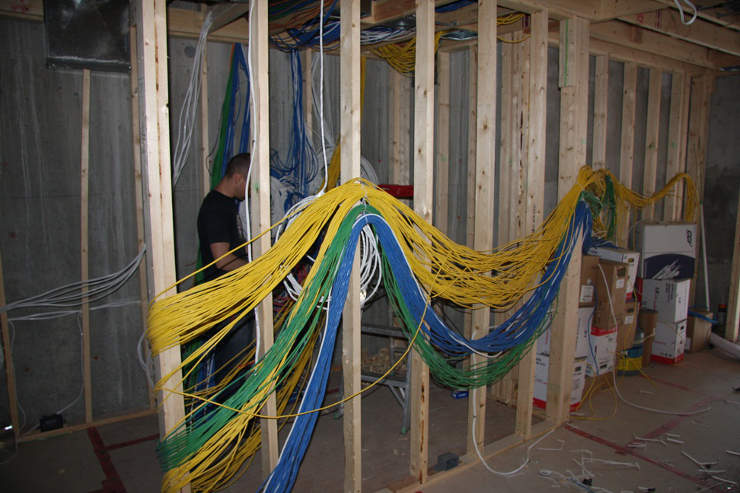
Yes. Example pictures from a prewire for future reference. Images, PDF, CSV
Create your own material list and import materials lists. Import Control4 price list
When adding or editing a job, simply check off which crew members are assigned to it. Those team members instantly see what jobs they have been assigned and scheduled to.
Generate detailed reports to track performance, client history and more. Historical data.
Graphs, averages and more. Is the job making you money?
Import your existing quickbooks customer list.
Create tasks to be used over and over on your Control4 custom av installation. Example: "System test", "Firmware update", "Client sign off", "Job Complete". You can choose to set a task template to automatically be added to every job or as an option. Very useful.
You can create entire job templates you can reuse to speed up your quotes and job entries. When doing a Control4 AV quote select as many templates as you want and all the template data will automatically be added to the new quote. Whether it's a small service call or a large project this is a very useful for Control4 AV integtrators. All labour, notes, materials, line items, tasks and financials. You can then edit and adjust as applicable to the quote or job entry. Create as many templates as you need. No Limit.
Control4 AV custom integtrator use example: TV Installation template has X hours of installation labour, 1 TV mount, 1 patch cable, 1 hdmi cable, tasks. Ceiling speaker installation template has X hour, 1 pair ceiling speakers, tasks. When adding a new small job that includes hanging a TV and installing a pair of ceiling speakers just select the 2 templates and all the hours, labour, materials, tasks will prefill for the new job. Adjust as needed. Very useful feature for Control4 custom AV integrators.
Need to share updated job details on the fly? Or just send the crew an email schedule? In seconds send job details to any of your crew or update the client for a progress report.
You can have as many billing rates as you require: Set rate, Cost plus amount, Cost plus percentage. Mix and match type to meet your company needs.
In BC Canada this is GST, PST. (Federal, Provincial). In Ontario it's just one rate HST. Use as required.
Set your user pay rates. Example if you pay a team member $50 per hour, input 50. You need to know how much they are costing you.
Add Control4 materials spreadsheet data directly to your account. We suggest you only add Control4 materials you use consistantly, the Control4 price list really huge and likely you won't use all the parts in it.
For control4 dealers we recomend you setup some basic task templates to automatically use over and over on all jobs: System test, firmware update. Things you do on every job over and over.
You have 2 options, stream lined fast job addition (small jobs) or detailed job addition (large projects) with materials, line items etc.